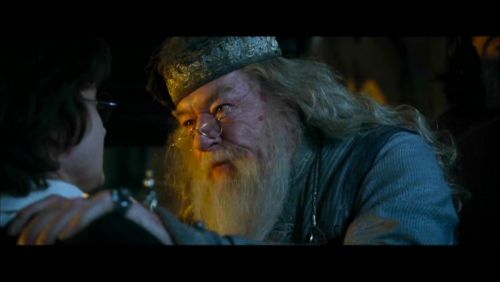
Caption the Angry Dumbledore Meme Template
Angry Dumbledore is a meme format referencing the infamous scene from Harry Potter and the Goblet of Fire (2005) in which Dumbledore aggressively questions Harry about putting his name in the Goblet of Fire, a scene widely criticized for contradicting the calm demeanor described in the book. The moment spawned the joke referencing Dumbledore asking calmly in the source novel, and is now used to caption any situation where someone reacts with disproportionate fury. It is ideal for mock-fury captions where the outrage is wildly out of proportion to the trigger.
Caption this template- Category
- Reaction Face Meme Templates
- Size
- 500 x 282 px
- Format
- Image
- Price
- Free, no sign up
Where the Angry Dumbledore meme comes from
Angry Dumbledore refers specifically to a scene in Harry Potter and the Goblet of Fire from 2005, directed by Mike Newell, in which actor Michael Gambon's portrayal of Albus Dumbledore confronts Harry Potter with visible aggression and physical intensity. This was widely noted by fans as a departure from J.K. Rowling's description of the same moment in the novel, where Dumbledore asked calmly. The discrepancy became a long-running fandom joke that was eventually formalized into an image macro.
How to caption the Angry Dumbledore meme
Caption the image by attributing a wildly disproportionate aggressive reaction to a minor trigger - Ideally ending with or alluding to he asked calmly to invoke the original fandom joke. The format works best when the fury described is so clearly excessive that the calmness disclaimer becomes absurd, mirroring the film-vs-book discrepancy that spawned the meme. Open it in the meme generator, or read the reaction meme guide for more.
Angry Dumbledore caption ideas
Need a starting point? Try one of these on the Angry Dumbledore template, then make it your own in the meme generator.
- DID YOU PUT MY CHARGER IN THE OTHER ROOM?! he asked calmly
- WHO LEFT ONE SQUARE OF TOILET PAPER ON THE ROLL?! he asked calmly
- DID YOU EAT MY CLEARLY LABELED LEFTOVERS?! he asked calmly
- WHY IS THE THERMOSTAT SET TO 81 DEGREES?! he asked calmly
- DID YOU SAY 'WE SHOULD HANG OUT SOON' AND THEN NEVER FOLLOW UP?! he asked calmly
Best uses for the Angry Dumbledore template
Use the Angry Dumbledore template when the joke fits a reaction face format and the image can explain the feeling before the reader finishes the caption. It is strongest for reaction memes, group chat replies, and quick emotional punchlines.
This blank is 500 x 282 px and is a still image, so place the most important words where they stay readable after a feed crop. The wide frame works best when the caption stays centered so timeline crops do not cut off the joke.
The sample captions leave room for a setup and a punchline without turning into a paragraph. Before exporting, read the caption once without looking at the image; if it still needs a long explanation, switch to a simpler setup or a more obvious related template.
Caption patterns to try
| Pattern | Why it works |
|---|---|
| DID YOU PUT MY CHARGER IN THE OTHER ROOM?! he asked calmly | This works because it gives the reader a specific situation instead of a vague label. |
| WHO LEFT ONE SQUARE OF TOILET PAPER ON THE ROLL?! he asked calmly | This pattern keeps the setup concrete, which helps the template carry the reaction. |
| DID YOU EAT MY CLEARLY LABELED LEFTOVERS?! he asked calmly | This is a useful direction when you want the punchline to feel personal or self-aware. |
Common mistakes with this blank
- Writing a caption that explains the whole joke instead of letting the Angry Dumbledore image do part of the work.
- Placing text over the most expressive part of the image, especially faces, gestures, signs, or the main action.
- Using three different ideas in one meme. This template works better when it points at one clear situation.
- Exporting before checking the meme at phone size. If the smallest words blur together, shorten the caption first.