Caption the Bad Luck Bear Meme Template
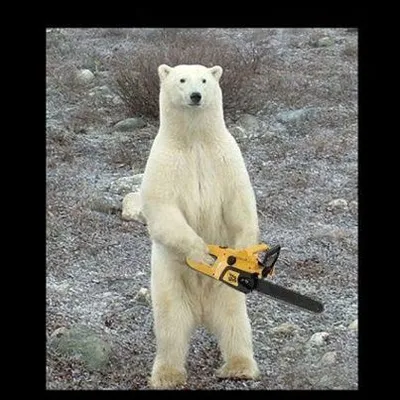
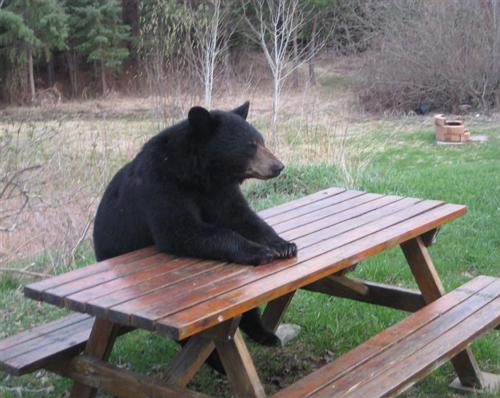
Bad Luck Bear is an animal image macro featuring a bear in an unfortunate or pitiable situation, used to express a streak of undeserved misfortune in the tradition of Bad Luck Brian. The format extends the nothing-goes-right complaint genre to the animal kingdom, applying the same escalating-misfortune structure to a bear protagonist. It works well for cataloguing the specific type of bad luck that feels cosmically unfair rather than self-inflicted.
Caption this template- Category
- Animal Meme Templates
- Size
- 500 x 398 px
- Format
- Image
- Price
- Free, no sign up
Where the Bad Luck Bear meme comes from
Bad Luck Bear appears to have originated as a spin-off of the Bad Luck Brian advice animal format that peaked on Reddit around 2012, with a bear image substituted to create an animal-themed variant. The specific photograph used typically features a bear in a genuinely awkward or unfortunate-looking position, often sourced from wildlife photography. The format belongs to the extended advice animal family tree that spawned numerous character variants throughout the early 2010s.
How to caption the Bad Luck Bear meme
Stack two or three escalating misfortunes in the caption, each worse than the last, ending on the most absurd or unfair outcome - The bear's expression should feel like the face of someone processing all of it simultaneously. The best captions describe bad luck that is specific enough to feel real but absurd enough to be funny rather than genuinely depressing. Open it in the meme generator, or read the wholesome meme guide for more.
Bad Luck Bear caption ideas
Need a starting point? Try one of these on the Bad Luck Bear template, then make it your own in the meme generator.
- Finally gets a parking spot up front / It's reserved for the employee who took your job application
- Wakes up early for the gym / Forgot it was the one day they close for maintenance
- Saves up for a vacation / Airline cancels the flight and refunds it in 'travel credits' that expire in two weeks
- Matches with someone cute on the app / They unmatch the second after you send the first message
- Gets the promotion / Same week the whole department gets restructured and the title no longer exists
Best uses for the Bad Luck Bear template
Use the Bad Luck Bear template when the joke fits a animal format and the image can explain the feeling before the reader finishes the caption. It is strongest for cute reactions, chaotic moods, and warm low-stakes jokes.
This blank is 500 x 398 px and is a still image, so place the most important words where they stay readable after a feed crop. The wide frame works best when the caption stays centered so timeline crops do not cut off the joke.
The sample captions are more detailed, so trim aggressively before posting on small screens. Before exporting, read the caption once without looking at the image; if it still needs a long explanation, switch to a simpler setup or a more obvious related template.
Caption patterns to try
| Pattern | Why it works |
|---|---|
| Finally gets a parking spot up front / It's reserved for the employee who took your job application | This works because it gives the reader a specific situation instead of a vague label. |
| Wakes up early for the gym / Forgot it was the one day they close for maintenance | This pattern keeps the setup concrete, which helps the template carry the reaction. |
| Saves up for a vacation / Airline cancels the flight and refunds it in 'travel credits' that expire in two weeks | This is a useful direction when you want the punchline to feel personal or self-aware. |
Common mistakes with this blank
- Writing a caption that explains the whole joke instead of letting the Bad Luck Bear image do part of the work.
- Placing text over the most expressive part of the image, especially faces, gestures, signs, or the main action.
- Using three different ideas in one meme. This template works better when it points at one clear situation.
- Exporting before checking the meme at phone size. If the smallest words blur together, shorten the caption first.