Caption the Bazooka Squirrel Meme Template
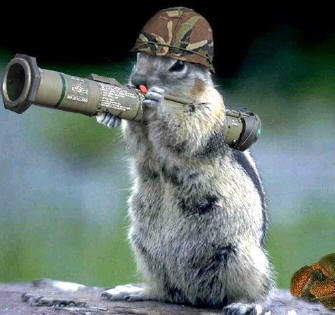
A photoshopped or illustrated image of a squirrel posed as if holding or firing a bazooka, making the normally harmless animal look menacing and heavily armed. Used to caption situations where someone small or unexpected is preparing to bring disproportionate force to a minor problem.
Caption this template- Category
- Animal Meme Templates
- Size
- 335 x 315 px
- Format
- Image
- Price
- Free, no sign up
Where the Bazooka Squirrel meme comes from
The bazooka squirrel is a photoshop or digital illustration meme that combines the internet's long-standing affection for squirrel photos with the comedic premise of an armed rodent. It draws energy from the Crasher Squirrel viral photo phenomenon that made squirrels a beloved internet subject around 2009, and the exact source appears to be a digital composite.
How to caption the Bazooka Squirrel meme
Describe the minor grievance or slight that has been committed in the top text, and use the bottom text to reveal that the squirrel has decided this warrants a completely disproportionate military response. Specificity in the grievance makes the escalation much funnier. Open it in the meme generator, or read the wholesome meme guide for more.
Bazooka Squirrel caption ideas
Need a starting point? Try one of these on the Bazooka Squirrel template, then make it your own in the meme generator.
- Top: Someone parked one inch over the line near my tree / Bottom: time to recalibrate the launcher
- Top: A jogger took a slightly different path through my park / Bottom: this means war
- Top: The bird feeder was refilled and I wasn't told / Bottom: deploying immediate consequences
- Top: My nut stash was disturbed by exactly one acorn / Bottom: someone is about to learn a lesson
- Top: A leaf blower interrupted my afternoon / Bottom: returning fire, no survivors among the leaves
Best uses for the Bazooka Squirrel template
Use the Bazooka Squirrel template when the joke fits a animal format and the image can explain the feeling before the reader finishes the caption. It is strongest for cute reactions, chaotic moods, and warm low-stakes jokes.
This blank is 335 x 315 px and is a still image, so place the most important words where they stay readable after a feed crop. The near-square frame is flexible for feeds, group chats, Reddit, and Discord.
The sample captions are more detailed, so trim aggressively before posting on small screens. Before exporting, read the caption once without looking at the image; if it still needs a long explanation, switch to a simpler setup or a more obvious related template.
Caption patterns to try
| Pattern | Why it works |
|---|---|
| Top: Someone parked one inch over the line near my tree / Bottom: time to recalibrate the launcher | This works because it gives the reader a specific situation instead of a vague label. |
| Top: A jogger took a slightly different path through my park / Bottom: this means war | This pattern keeps the setup concrete, which helps the template carry the reaction. |
| Top: The bird feeder was refilled and I wasn't told / Bottom: deploying immediate consequences | This is a useful direction when you want the punchline to feel personal or self-aware. |
Common mistakes with this blank
- Writing a caption that explains the whole joke instead of letting the Bazooka Squirrel image do part of the work.
- Placing text over the most expressive part of the image, especially faces, gestures, signs, or the main action.
- Using three different ideas in one meme. This template works better when it points at one clear situation.
- Exporting before checking the meme at phone size. If the smallest words blur together, shorten the caption first.