Caption the Confused Gandalf Meme Template
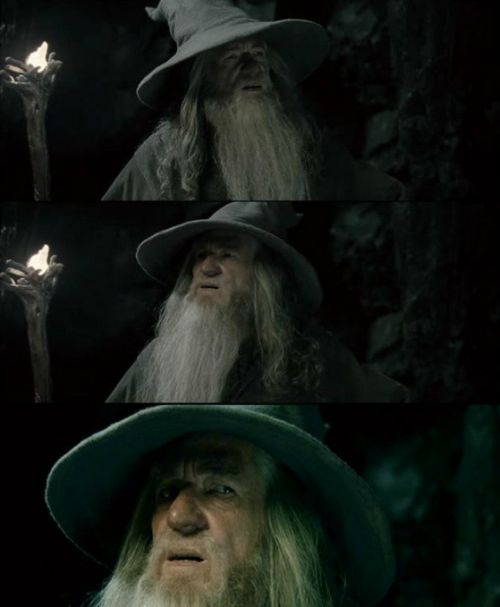
Gandalf from The Lord of the Rings looking confused or bewildered drives this template, used as a reaction to things that are inexplicably strange, logically inconsistent, or impossible to make sense of. It is a classic fantasy reaction image for genuine bafflement.
Caption this template- Category
- Reaction Face Meme Templates
- Size
- 500 x 607 px
- Format
- Image
- Price
- Free, no sign up
Where the Confused Gandalf meme comes from
The image is taken from Peter Jackson's Lord of the Rings film trilogy, based on J.R.R. Tolkien's novels, with Ian McKellen playing Gandalf. The specific confused expression has been isolated from various scenes and circulated as a reaction image since the early 2010s, benefiting from the trilogy's enormous cultural footprint.
How to caption the Confused Gandalf meme
Caption the image with the thing that is making no sense - A policy, a plot hole, a social norm - And let Gandalf's profound confusion represent your own inability to process it. Works best when the confusing thing logically should not function the way it does, making a wizard's bewilderment feel entirely appropriate. Open it in the meme generator, or read the reaction meme guide for more.
Confused Gandalf caption ideas
Need a starting point? Try one of these on the Confused Gandalf template, then make it your own in the meme generator.
- Me trying to understand how the printer worked yesterday and is now sentient and hostile
- When the bug only happens in production and never when you're watching
- Reading 'reply all' threads where 40 people just say 'thanks'
- Looking at my bank statement trying to find the charge labeled 'SQ *MISC'
- When the recipe says 'season to taste' and I have no idea what that means
Best uses for the Confused Gandalf template
Use the Confused Gandalf template when the joke fits a reaction face format and the image can explain the feeling before the reader finishes the caption. It is strongest for reaction memes, group chat replies, and quick emotional punchlines.
This blank is 500 x 607 px and is a still image, so place the most important words where they stay readable after a feed crop. The tall frame gives you room for a short setup near the top and a payoff below the main subject.
The sample captions leave room for a setup and a punchline without turning into a paragraph. Before exporting, read the caption once without looking at the image; if it still needs a long explanation, switch to a simpler setup or a more obvious related template.
Caption patterns to try
| Pattern | Why it works |
|---|---|
| Me trying to understand how the printer worked yesterday and is now sentient and hostile | This works because it gives the reader a specific situation instead of a vague label. |
| When the bug only happens in production and never when you're watching | This pattern keeps the setup concrete, which helps the template carry the reaction. |
| Reading 'reply all' threads where 40 people just say 'thanks' | This is a useful direction when you want the punchline to feel personal or self-aware. |
Common mistakes with this blank
- Writing a caption that explains the whole joke instead of letting the Confused Gandalf image do part of the work.
- Placing text over the most expressive part of the image, especially faces, gestures, signs, or the main action.
- Using three different ideas in one meme. This template works better when it points at one clear situation.
- Exporting before checking the meme at phone size. If the smallest words blur together, shorten the caption first.