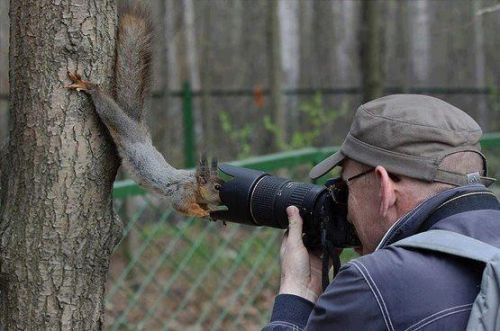
Caption the Jehovas Witness Squirrel Meme Template
Jehovas Witness Squirrel is a humor meme featuring a squirrel photographed in a pose that resembles knocking on a door or standing at a threshold, evoking the door-to-door visits associated with Jehovah's Witnesses. The format is used to joke about persistent, unwelcome visitors, unsolicited opinions, or anything that shows up at the worst possible time. It plays on the relatable experience of pretending not to be home.
Caption this template- Category
- Animal Meme Templates
- Size
- 500 x 331 px
- Format
- Image
- Price
- Free, no sign up
Where the Jehovas Witness Squirrel meme comes from
A candid wildlife photograph - In which a squirrel's natural behavior happened to look anthropomorphically like someone ringing a doorbell or waiting at a front door - Is what the image appears to be. Through humor sites and Reddit in the early-to-mid 2010s it spread, gaining traction as a reaction image for jokes about interruption.
How to caption the Jehovas Witness Squirrel meme
Caption the image as the squirrel arriving with pamphlets at precisely the moment you have sat down after a long day, with an internal monologue about staying very still. You can also repurpose it for any uninvited idea that keeps coming back - A diet, a work email, a memory you've been suppressing. Open it in the meme generator, or read the wholesome meme guide for more.
Jehovas Witness Squirrel caption ideas
Need a starting point? Try one of these on the Jehovas Witness Squirrel template, then make it your own in the meme generator.
- Top: Finally sat down after a 12-hour shift / Bottom: the squirrel arrives with pamphlets, I must stay perfectly still
- Top: 2 minutes into relaxing on my one day off / Bottom: knock knock, it's the unsolicited opinion at my door
- Top: That diet I quit three weeks ago / Bottom: standing at the threshold like it never left
- Top: The work email I 'didn't see' on Friday / Bottom: back on Monday, ringing the bell again
- Top: A memory from 2009 I had successfully suppressed / Bottom: at the door at 3am, refusing to leave
Best uses for the Jehovas Witness Squirrel template
Use the Jehovas Witness Squirrel template when the joke fits a animal format and the image can explain the feeling before the reader finishes the caption. It is strongest for cute reactions, chaotic moods, and warm low-stakes jokes.
This blank is 500 x 331 px and is a still image, so place the most important words where they stay readable after a feed crop. The wide frame works best when the caption stays centered so timeline crops do not cut off the joke.
The sample captions are more detailed, so trim aggressively before posting on small screens. Before exporting, read the caption once without looking at the image; if it still needs a long explanation, switch to a simpler setup or a more obvious related template.
Caption patterns to try
| Pattern | Why it works |
|---|---|
| Top: Finally sat down after a 12-hour shift / Bottom: the squirrel arrives with pamphlets, I must stay perfectly still | This works because it gives the reader a specific situation instead of a vague label. |
| Top: 2 minutes into relaxing on my one day off / Bottom: knock knock, it's the unsolicited opinion at my door | This pattern keeps the setup concrete, which helps the template carry the reaction. |
| Top: That diet I quit three weeks ago / Bottom: standing at the threshold like it never left | This is a useful direction when you want the punchline to feel personal or self-aware. |
Common mistakes with this blank
- Writing a caption that explains the whole joke instead of letting the Jehovas Witness Squirrel image do part of the work.
- Placing text over the most expressive part of the image, especially faces, gestures, signs, or the main action.
- Using three different ideas in one meme. This template works better when it points at one clear situation.
- Exporting before checking the meme at phone size. If the smallest words blur together, shorten the caption first.