Caption the Squidward window Meme Template
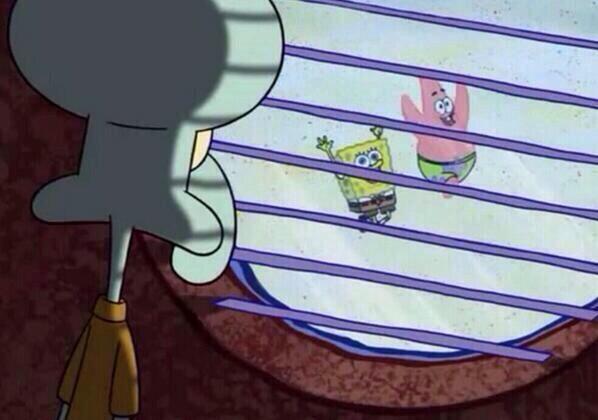
Squidward Window shows a SpongeBob character peering through venetian blinds with hollow eyes and a haunted expression. It represents lurking, jealousy, or watching someone else have the fun or success you were supposed to have.
Caption this template- Category
- Movie and TV Meme Templates
- Size
- 598 x 420 px
- Format
- Image
- Price
- Free, no sign up
Where the Squidward window meme comes from
The frame is from the SpongeBob SquarePants animated series. The image of Squidward spying through his window became a meme for envy and silent suffering around 2018, often used to react to other people's celebrations.
How to caption the Squidward window meme
Caption what is being watched outside the blinds. The joke works when the thing Squidward is watching is something he secretly wants and publicly pretends to be above. Envy that the poster barely admits is the heart of the format. Open it in the meme generator, or read why memes go viral for more.
Squidward window caption ideas
Need a starting point? Try one of these on the Squidward window template, then make it your own in the meme generator.
- Watching my coworker get praised for the project I built and they presented
- Watching the group chat make plans I wasn't invited to from my apartment window
- Watching everyone post their vacation photos while I cover their shifts
- Watching my gym buddy hit a new PR while I'm benched with a tweaked back
- Watching the new hire get the desk by the window I asked for two years ago
Best uses for the Squidward window template
Use the Squidward window template when the joke fits a movie and TV format and the image can explain the feeling before the reader finishes the caption. It is strongest for recognizable scenes, character reactions, and pop-culture punchlines.
This blank is 598 x 420 px and is a still image, so place the most important words where they stay readable after a feed crop. The wide frame works best when the caption stays centered so timeline crops do not cut off the joke.
The sample captions leave room for a setup and a punchline without turning into a paragraph. Before exporting, read the caption once without looking at the image; if it still needs a long explanation, switch to a simpler setup or a more obvious related template.
Caption patterns to try
| Pattern | Why it works |
|---|---|
| Watching my coworker get praised for the project I built and they presented | This works because it gives the reader a specific situation instead of a vague label. |
| Watching the group chat make plans I wasn't invited to from my apartment window | This pattern keeps the setup concrete, which helps the template carry the reaction. |
| Watching everyone post their vacation photos while I cover their shifts | This is a useful direction when you want the punchline to feel personal or self-aware. |
Common mistakes with this blank
- Writing a caption that explains the whole joke instead of letting the Squidward window image do part of the work.
- Placing text over the most expressive part of the image, especially faces, gestures, signs, or the main action.
- Using three different ideas in one meme. This template works better when it points at one clear situation.
- Exporting before checking the meme at phone size. If the smallest words blur together, shorten the caption first.