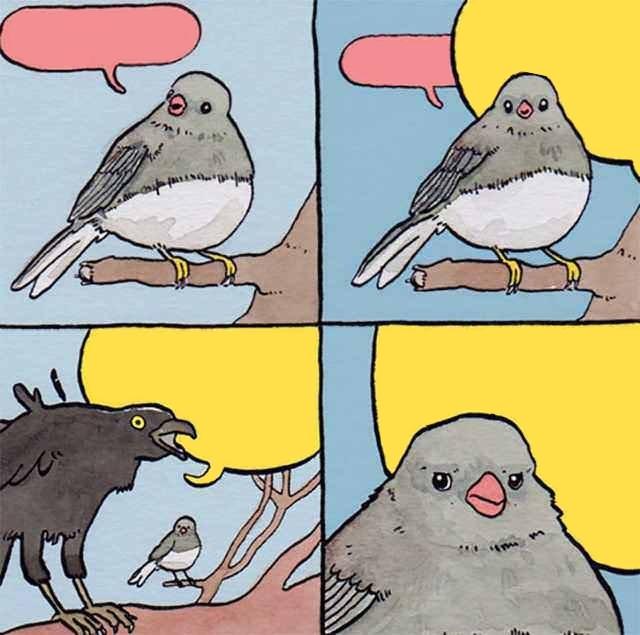
Caption the Annoying Crow Meme Template
A crow behaves in an intrusive or obnoxious way in this template, representing persistent, unwanted annoyances that refuse to leave you alone. Anything that keeps demanding your attention despite being told to stop - Notifications, responsibilities, people, or thoughts - Is what it gets applied to.
Caption this template- Category
- Situation Meme Templates
- Size
- 640 x 635 px
- Format
- Image
- Price
- Free, no sign up
Where the Annoying Crow meme comes from
A photograph or video of a crow engaging in characteristically bold behavior appears to be the source, since crows are well-documented for their intelligence, curiosity, and willingness to interact aggressively with humans and other animals. The exact source photo isn't definitively attributed, but crow behavior memes have enjoyed popularity in wildlife and humor communities.
How to caption the Annoying Crow meme
Label the crow as the specific annoyance in your life - A recurring task, an intrusive thought, or a person - And caption yourself as someone trying and failing to make it go away. Alternatively, use the crow to represent your own brain fixating on something embarrassing from years ago at the worst possible moment. Open it in the meme generator, or read how to make relatable memes for more.
Annoying Crow caption ideas
Need a starting point? Try one of these on the Annoying Crow template, then make it your own in the meme generator.
- Crow: the one Slack notification that won't stop bubbling while I'm clearly on lunch
- Crow: my brain replaying that awkward thing I said in 2014, right as I'm falling asleep
- Crow: the app reminding me I haven't opened it in 3 days, for the 3rd time today
- Crow: the friend who keeps 'just checking in' about plans I already said maybe to
- Crow: the low-tire-pressure light that's been on since spring
Best uses for the Annoying Crow template
Use the Annoying Crow template when the joke fits a situation format and the image can explain the feeling before the reader finishes the caption. It is strongest for relatable everyday moments, before-and-after jokes, and social observations.
This blank is 640 x 635 px and is a still image, so place the most important words where they stay readable after a feed crop. The near-square frame is flexible for feeds, group chats, Reddit, and Discord.
The sample captions leave room for a setup and a punchline without turning into a paragraph. Before exporting, read the caption once without looking at the image; if it still needs a long explanation, switch to a simpler setup or a more obvious related template.
Caption patterns to try
| Pattern | Why it works |
|---|---|
| Crow: the one Slack notification that won't stop bubbling while I'm clearly on lunch | This works because it gives the reader a specific situation instead of a vague label. |
| Crow: my brain replaying that awkward thing I said in 2014, right as I'm falling asleep | This pattern keeps the setup concrete, which helps the template carry the reaction. |
| Crow: the app reminding me I haven't opened it in 3 days, for the 3rd time today | This is a useful direction when you want the punchline to feel personal or self-aware. |
Common mistakes with this blank
- Writing a caption that explains the whole joke instead of letting the Annoying Crow image do part of the work.
- Placing text over the most expressive part of the image, especially faces, gestures, signs, or the main action.
- Using three different ideas in one meme. This template works better when it points at one clear situation.
- Exporting before checking the meme at phone size. If the smallest words blur together, shorten the caption first.