Caption the Boardroom Meeting Suggestion Meme Template
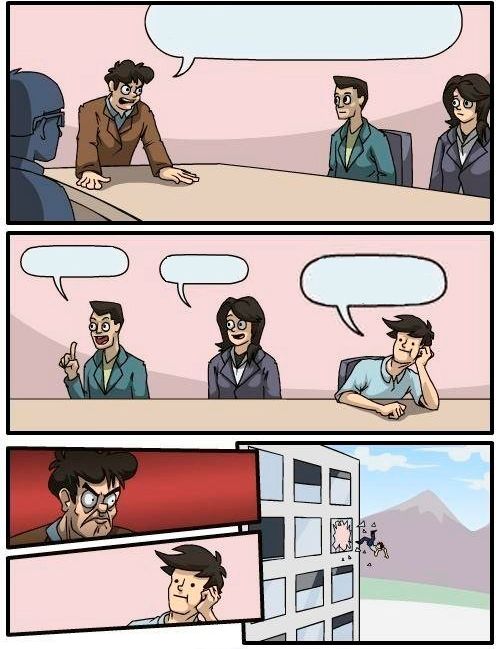
Boardroom Meeting Suggestion shows an employee pitching an idea to a boss in a meeting, only to be ignored, while a second employee repeats the exact same idea and receives full credit and applause. It is used to show that the same idea lands very differently depending on who says it.
Caption this template- Category
- Situation Meme Templates
- Size
- 500 x 649 px
- Format
- Image
- Price
- Free, no sign up
Where the Boardroom Meeting Suggestion meme comes from
The format uses clipart or illustrated business figures and has been a staple macro since the early 2010s. The four-panel structure maps a universal workplace experience onto a compact visual joke.
How to caption the Boardroom Meeting Suggestion meme
Write the idea in the employee's panel, keep it identical in the sycophant's panel, and let the boss's reaction flip completely. The joke is funnier when the idea is genuinely good and the only difference is the person delivering it. Open it in the meme generator, or read how to make relatable memes for more.
Boardroom Meeting Suggestion caption ideas
Need a starting point? Try one of these on the Boardroom Meeting Suggestion template, then make it your own in the meme generator.
- Me: 'We should let people work from home on Fridays' / Boss: 'No.' / Chad: 'What if we offered remote Fridays?' / Boss: 'Brilliant! Promote this man.'
- Me: 'The deadline is unrealistic' / Boss: throws me out the window / Greg: 'Maybe the timeline needs adjusting' / Boss: 'Visionary.'
- Me: 'We should test before we ship' / Boss: ignores me / New guy: 'What about QA before release?' / Boss: 'Genius, never thought of it'
- Me: 'Customers want a dark mode' / Boss: 'No.' / Intern: 'Users keep requesting dark mode' / Boss: 'Innovative! Bonus for you.'
- Me: 'We're overbooking the schedule' / Boss: defenestrates me / Karen: 'The calendar looks a little full' / Boss: 'Such insight.'
Best uses for the Boardroom Meeting Suggestion template
Use the Boardroom Meeting Suggestion template when the joke fits a situation format and the image can explain the feeling before the reader finishes the caption. It is strongest for relatable everyday moments, before-and-after jokes, and social observations.
This blank is 500 x 649 px and is a still image, so place the most important words where they stay readable after a feed crop. The tall frame gives you room for a short setup near the top and a payoff below the main subject.
The sample captions are more detailed, so trim aggressively before posting on small screens. Before exporting, read the caption once without looking at the image; if it still needs a long explanation, switch to a simpler setup or a more obvious related template.
Caption patterns to try
| Pattern | Why it works |
|---|---|
| Me: 'We should let people work from home on Fridays' / Boss: 'No.' / Chad: 'What if we offered remote Fridays?' / Boss: 'Brilliant! Promote this man.' | This works because it gives the reader a specific situation instead of a vague label. |
| Me: 'The deadline is unrealistic' / Boss: throws me out the window / Greg: 'Maybe the timeline needs adjusting' / Boss: 'Visionary.' | This pattern keeps the setup concrete, which helps the template carry the reaction. |
| Me: 'We should test before we ship' / Boss: ignores me / New guy: 'What about QA before release?' / Boss: 'Genius, never thought of it' | This is a useful direction when you want the punchline to feel personal or self-aware. |
Common mistakes with this blank
- Writing a caption that explains the whole joke instead of letting the Boardroom Meeting Suggestion image do part of the work.
- Placing text over the most expressive part of the image, especially faces, gestures, signs, or the main action.
- Using three different ideas in one meme. This template works better when it points at one clear situation.
- Exporting before checking the meme at phone size. If the smallest words blur together, shorten the caption first.