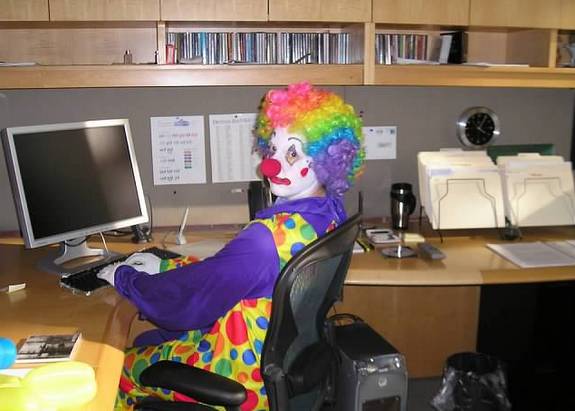
Caption the Clown Computer Meme Template
A clown sits at a computer in this template, deployed whenever someone makes ridiculous decisions, does something obviously foolish, or confidently acts on bad information online. The gap between how serious an action is and how incompetent the reasoning behind it is gets mocked here.
Caption this template- Category
- Situation Meme Templates
- Size
- 575 x 411 px
- Format
- Image
- Price
- Free, no sign up
Where the Clown Computer meme comes from
Likely staged for stock or captured as a posed photograph, the source shows a person in full clown costume and makeup working at a desktop computer. Because professional clown attire paired with office work reads as instantly absurd, it became a natural fit for mocking poor reasoning and internet behavior.
How to caption the Clown Computer meme
Caption the clown as yourself or a specific type of person, then describe the ridiculous or counterproductive thing they are doing online or at work. You can also use it in a self-aware format where the clown represents you engaging in a behavior you know is dumb but do anyway. Open it in the meme generator, or read how to make relatable memes for more.
Clown Computer caption ideas
Need a starting point? Try one of these on the Clown Computer template, then make it your own in the meme generator.
- Me at 2am buying a $400 standing desk so I'll finally start the side project I haven't touched in 8 months
- Confidently arguing with a stranger online about a recipe I have never once cooked
- Replying-all to the entire company to say 'I think this email wasn't meant for me'
- Googling my symptoms, diagnosing myself with three rare diseases, then booking a haircut instead of a doctor
- Pushing straight to main on a Friday at 4:55pm because 'it's a tiny change'
Best uses for the Clown Computer template
Use the Clown Computer template when the joke fits a situation format and the image can explain the feeling before the reader finishes the caption. It is strongest for relatable everyday moments, before-and-after jokes, and social observations.
This blank is 575 x 411 px and is a still image, so place the most important words where they stay readable after a feed crop. The wide frame works best when the caption stays centered so timeline crops do not cut off the joke.
The sample captions are more detailed, so trim aggressively before posting on small screens. Before exporting, read the caption once without looking at the image; if it still needs a long explanation, switch to a simpler setup or a more obvious related template.
Caption patterns to try
| Pattern | Why it works |
|---|---|
| Me at 2am buying a $400 standing desk so I'll finally start the side project I haven't touched in 8 months | This works because it gives the reader a specific situation instead of a vague label. |
| Confidently arguing with a stranger online about a recipe I have never once cooked | This pattern keeps the setup concrete, which helps the template carry the reaction. |
| Replying-all to the entire company to say 'I think this email wasn't meant for me' | This is a useful direction when you want the punchline to feel personal or self-aware. |
Common mistakes with this blank
- Writing a caption that explains the whole joke instead of letting the Clown Computer image do part of the work.
- Placing text over the most expressive part of the image, especially faces, gestures, signs, or the main action.
- Using three different ideas in one meme. This template works better when it points at one clear situation.
- Exporting before checking the meme at phone size. If the smallest words blur together, shorten the caption first.