Caption the Evil Toddler Meme Template
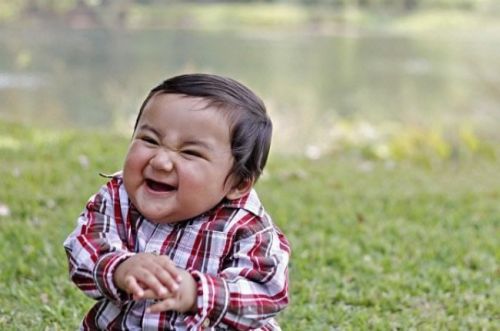
The Evil Toddler template features a young child with a wide, slightly unnerving grin that reads as smug or mischievous rather than innocent, used to represent someone enjoying chaos they have set in motion. It is deployed to express the feeling of having caused a minor disruption and being completely unbothered, even delighted, by the fallout. The toddler's expression captures the energy of petty scheming with zero consequences.
Caption this template- Category
- Situation Meme Templates
- Size
- 500 x 331 px
- Format
- Image
- Price
- Free, no sign up
Where the Evil Toddler meme comes from
A real photograph of a toddler, whose smile internet users read as menacing, seems to be the source, and it began making the rounds on Reddit and image boards in the early 2010s as a reaction image for smug troublemaking. While the photo's exact origin is unclear, it spread organically through reaction image communities.
How to caption the Evil Toddler meme
Drop in a caption describing something innocuous you did knowing full well it would cause mild chaos for somebody else, like leaving exactly one sip of juice in the container and putting it back. Match the image with the moment you hit send on a passive-aggressive message and instantly closed your phone. Open it in the meme generator, or read how to make relatable memes for more.
Evil Toddler caption ideas
Need a starting point? Try one of these on the Evil Toddler template, then make it your own in the meme generator.
- Setting all my coworker's slack notifications to play a sound, then logging off.
- Telling the new intern the meeting is at 9 when it's actually at 8:30.
- Replying-all to a 200-person email just to say 'thanks!'
- Hiding the one pen that actually works in the entire office.
- Eating the last donut and leaving the empty box on the counter.
Best uses for the Evil Toddler template
Use the Evil Toddler template when the joke fits a situation format and the image can explain the feeling before the reader finishes the caption. It is strongest for relatable everyday moments, before-and-after jokes, and social observations.
This blank is 500 x 331 px and is a still image, so place the most important words where they stay readable after a feed crop. The wide frame works best when the caption stays centered so timeline crops do not cut off the joke.
The sample captions leave room for a setup and a punchline without turning into a paragraph. Before exporting, read the caption once without looking at the image; if it still needs a long explanation, switch to a simpler setup or a more obvious related template.
Caption patterns to try
| Pattern | Why it works |
|---|---|
| Setting all my coworker's slack notifications to play a sound, then logging off. | This works because it gives the reader a specific situation instead of a vague label. |
| Telling the new intern the meeting is at 9 when it's actually at 8:30. | This pattern keeps the setup concrete, which helps the template carry the reaction. |
| Replying-all to a 200-person email just to say 'thanks!' | This is a useful direction when you want the punchline to feel personal or self-aware. |
Common mistakes with this blank
- Writing a caption that explains the whole joke instead of letting the Evil Toddler image do part of the work.
- Placing text over the most expressive part of the image, especially faces, gestures, signs, or the main action.
- Using three different ideas in one meme. This template works better when it points at one clear situation.
- Exporting before checking the meme at phone size. If the smallest words blur together, shorten the caption first.