Caption the Mr Krabs Blur Meme Meme Template
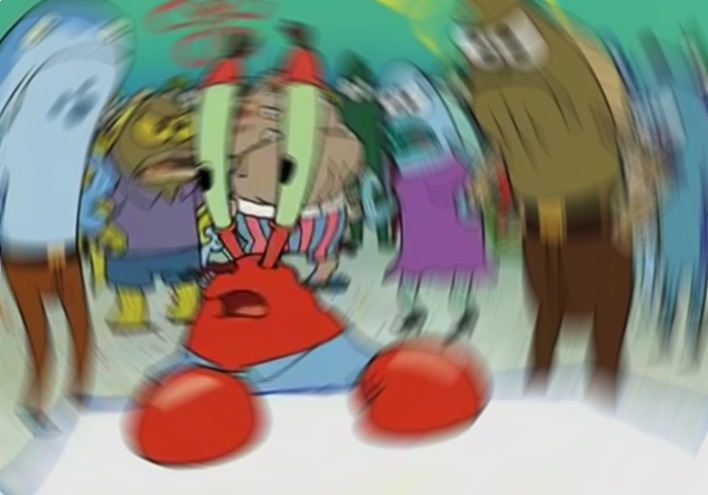
The Mr. Krabs blur meme features Eugene Krabs from SpongeBob SquarePants spinning in a disoriented, blurred state and is used to represent the feeling of total overwhelm, confusion, or not knowing where to look first when multiple problems demand attention simultaneously. It visually encapsulates sensory overload.
Caption this template- Category
- Situation Meme Templates
- Size
- 708 x 495 px
- Format
- Image
- Price
- Free, no sign up
Where the Mr Krabs Blur Meme meme comes from
The image is sourced from SpongeBob SquarePants, created by Stephen Hillenburg and airing on Nickelodeon since 1999. The specific blurred spinning Mr. Krabs frame comes from a scene depicting his disorientation and was isolated as a reaction image that gained significant traction on Reddit, Twitter, and Instagram around 2016 to 2018.
How to caption the Mr Krabs Blur Meme meme
Pair the image with the pile of simultaneous responsibilities, bad news, or urgent notifications that have caused your brain to spin like Mr. Krabs. Reach for it to capture the exact moment when too many things are going wrong at once and your ability to prioritize has completely broken down. Open it in the meme generator, or read how to make relatable memes for more.
Mr Krabs Blur Meme caption ideas
Need a starting point? Try one of these on the Mr Krabs Blur Meme template, then make it your own in the meme generator.
- When three Slack channels, two emails, and my mom all need a reply right now
- Me realizing rent, taxes, and my car registration are all due the same week
- Trying to track which group chat I told which lie to
- When the professor says 'this will all be on the final' about everything
- Me walking into the kitchen and forgetting all five things I came in for
Best uses for the Mr Krabs Blur Meme template
Use the Mr Krabs Blur Meme template when the joke fits a situation format and the image can explain the feeling before the reader finishes the caption. It is strongest for relatable everyday moments, before-and-after jokes, and social observations.
This blank is 708 x 495 px and is a still image, so place the most important words where they stay readable after a feed crop. The wide frame works best when the caption stays centered so timeline crops do not cut off the joke.
The sample captions leave room for a setup and a punchline without turning into a paragraph. Before exporting, read the caption once without looking at the image; if it still needs a long explanation, switch to a simpler setup or a more obvious related template.
Caption patterns to try
| Pattern | Why it works |
|---|---|
| When three Slack channels, two emails, and my mom all need a reply right now | This works because it gives the reader a specific situation instead of a vague label. |
| Me realizing rent, taxes, and my car registration are all due the same week | This pattern keeps the setup concrete, which helps the template carry the reaction. |
| Trying to track which group chat I told which lie to | This is a useful direction when you want the punchline to feel personal or self-aware. |
Common mistakes with this blank
- Writing a caption that explains the whole joke instead of letting the Mr Krabs Blur Meme image do part of the work.
- Placing text over the most expressive part of the image, especially faces, gestures, signs, or the main action.
- Using three different ideas in one meme. This template works better when it points at one clear situation.
- Exporting before checking the meme at phone size. If the smallest words blur together, shorten the caption first.