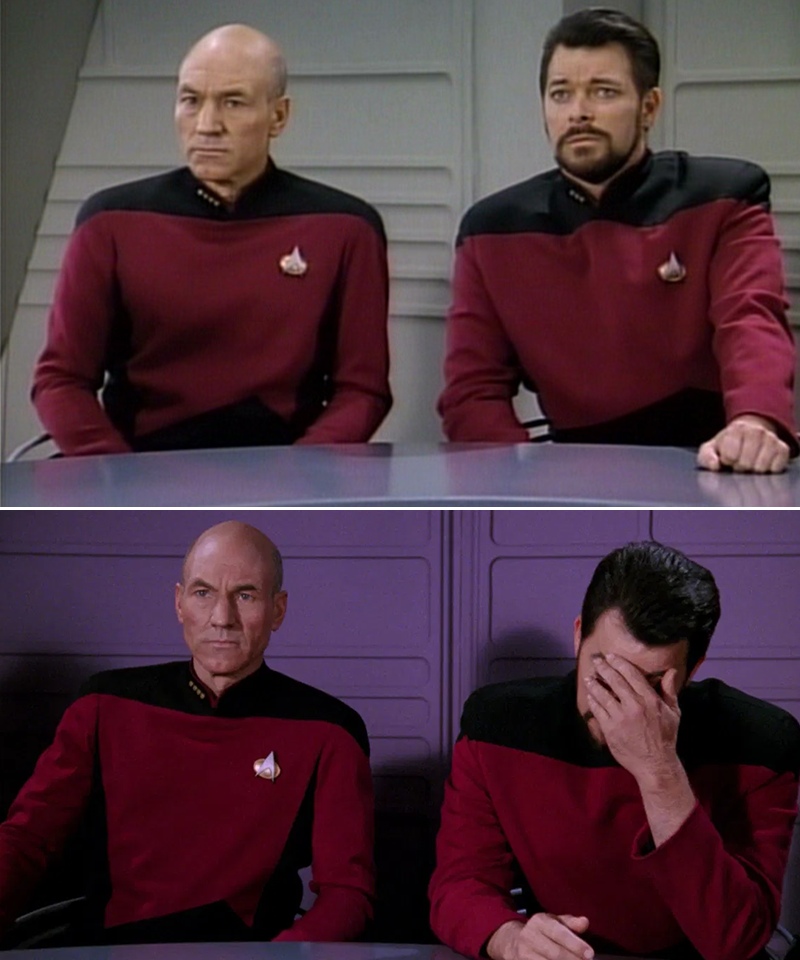
Caption the Picard Riker listening to a pun Meme Template
The Picard Riker Listening To A Pun template shows Captain Picard reacting with visible dismay or a facepalm while Commander Riker appears amused or unfazed, used specifically to represent the split reaction to a terrible pun - One person groaning while another finds it delightful. It is a staple for wordplay and dad-joke delivery.
Caption this template- Category
- Text and Sign Meme Templates
- Size
- 800 x 960 px
- Format
- Image
- Price
- Free, no sign up
Where the Picard Riker listening to a pun meme comes from
The image is taken from Star Trek: The Next Generation, the TV series that aired from 1987 to 1994, featuring Patrick Stewart as Captain Picard and Jonathan Frakes as Commander Riker. The specific still captures an expression of pained reaction that fans recognized as perfect for pun-related memes.
How to caption the Picard Riker listening to a pun meme
Write the pun or wordplay in the caption and label Picard as whoever is suffering through it while labeling Riker as whoever is delightedly laughing at their own joke. Works best when the pun is genuinely groan-worthy and the two labeled parties have a clear relationship where one person inflicts bad jokes on the other. Open it in the meme generator, or read the caption card guide for more.
Picard Riker listening to a pun caption ideas
Need a starting point? Try one of these on the Picard Riker listening to a pun template, then make it your own in the meme generator.
- Picard (me): suffering / Riker (my dad): 'I'm reading a book about anti-gravity, it's impossible to put down'
- Picard (my partner): facepalming / Riker (me): 'I used to be a banker but I lost interest'
- Picard (the team): groaning / Riker (the manager): 'This bug is a feature in disguise, get it?'
- Picard (the whole group chat): silence / Riker (one guy): 'I'm on a seafood diet, I see food and I eat it'
- Picard (my kid): 'Daaad' / Riker (me): 'I'm afraid for the calendar, its days are numbered'
Best uses for the Picard Riker listening to a pun template
Use the Picard Riker listening to a pun template when the joke fits a text and sign format and the image can explain the feeling before the reader finishes the caption. It is strongest for labels, announcements, warnings, and quote-style memes.
This blank is 800 x 960 px and is a still image, so place the most important words where they stay readable after a feed crop. The near-square frame is flexible for feeds, group chats, Reddit, and Discord.
The sample captions are more detailed, so trim aggressively before posting on small screens. Before exporting, read the caption once without looking at the image; if it still needs a long explanation, switch to a simpler setup or a more obvious related template.
Caption patterns to try
| Pattern | Why it works |
|---|---|
| Picard (me): suffering / Riker (my dad): 'I'm reading a book about anti-gravity, it's impossible to put down' | This works because it gives the reader a specific situation instead of a vague label. |
| Picard (my partner): facepalming / Riker (me): 'I used to be a banker but I lost interest' | This pattern keeps the setup concrete, which helps the template carry the reaction. |
| Picard (the team): groaning / Riker (the manager): 'This bug is a feature in disguise, get it?' | This is a useful direction when you want the punchline to feel personal or self-aware. |
Common mistakes with this blank
- Writing a caption that explains the whole joke instead of letting the Picard Riker listening to a pun image do part of the work.
- Placing text over the most expressive part of the image, especially faces, gestures, signs, or the main action.
- Using three different ideas in one meme. This template works better when it points at one clear situation.
- Exporting before checking the meme at phone size. If the smallest words blur together, shorten the caption first.