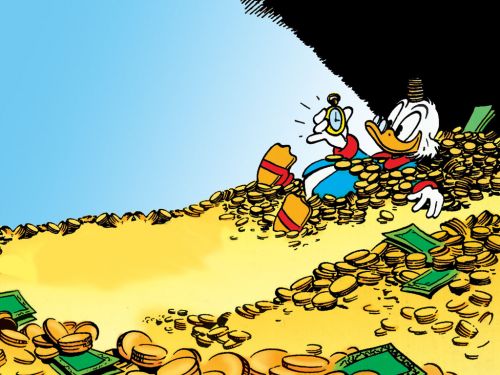
Caption the Scrooge McDuck Meme Template
Scrooge McDuck is a meme template featuring the iconic Disney character typically shown swimming in or gleefully surveying his massive vault of gold coins, used to represent extreme wealth, miserly hoarding, or gleeful greed. It appears in jokes about money, savings, and financial excess.
Caption this template- Category
- Animal Meme Templates
- Size
- 500 x 375 px
- Format
- Image
- Price
- Free, no sign up
Where the Scrooge McDuck meme comes from
Scrooge McDuck was created by Carl Barks for Disney in 1947 and became the central character of the DuckTales animated series that premiered in 1987. The money bin and coin-swimming scenes are among the most recognizable images from the franchise and have been memed extensively online.
How to caption the Scrooge McDuck meme
Label Scrooge or his money pile with the thing being hoarded or coveted in the top text, then use the bottom to express the delight or moral ambiguity of having so much of it. The joke works best when the wealth being depicted is something absurd or non-monetary. Open it in the meme generator, or read the wholesome meme guide for more.
Scrooge McDuck caption ideas
Need a starting point? Try one of these on the Scrooge McDuck template, then make it your own in the meme generator.
- Coins labeled: unread browser tabs / me, swimming gleefully in 47 of them
- Coins labeled: leftover Halloween candy in June / diving in, no regrets
- The vault labeled: unused subscriptions I forgot to cancel / look how rich I am
- Pile labeled: excuses for skipping the gym / I am the wealthiest man alive
- Coins labeled: USB cables that don't fit anything I own / and yet, I keep them all
Best uses for the Scrooge McDuck template
Use the Scrooge McDuck template when the joke fits a animal format and the image can explain the feeling before the reader finishes the caption. It is strongest for cute reactions, chaotic moods, and warm low-stakes jokes.
This blank is 500 x 375 px and is a still image, so place the most important words where they stay readable after a feed crop. The wide frame works best when the caption stays centered so timeline crops do not cut off the joke.
The sample captions leave room for a setup and a punchline without turning into a paragraph. Before exporting, read the caption once without looking at the image; if it still needs a long explanation, switch to a simpler setup or a more obvious related template.
Caption patterns to try
| Pattern | Why it works |
|---|---|
| Coins labeled: unread browser tabs / me, swimming gleefully in 47 of them | This works because it gives the reader a specific situation instead of a vague label. |
| Coins labeled: leftover Halloween candy in June / diving in, no regrets | This pattern keeps the setup concrete, which helps the template carry the reaction. |
| The vault labeled: unused subscriptions I forgot to cancel / look how rich I am | This is a useful direction when you want the punchline to feel personal or self-aware. |
Common mistakes with this blank
- Writing a caption that explains the whole joke instead of letting the Scrooge McDuck image do part of the work.
- Placing text over the most expressive part of the image, especially faces, gestures, signs, or the main action.
- Using three different ideas in one meme. This template works better when it points at one clear situation.
- Exporting before checking the meme at phone size. If the smallest words blur together, shorten the caption first.