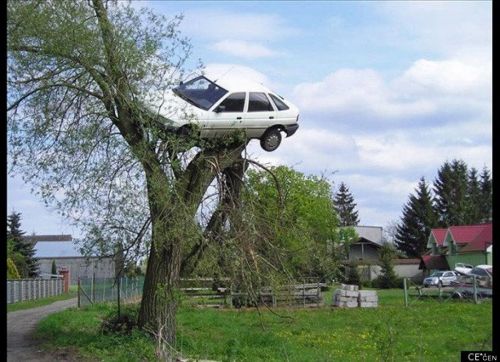
Caption the Secure Parking Meme Template
Secure Parking is a Situations meme template built around the concept of a parking area that claims to be secure while the surroundings make that claim obviously false. It is used to mock false promises of safety, security theater, or situations where stated protections are clearly inadequate.
Caption this template- Category
- Situation Meme Templates
- Size
- 500 x 362 px
- Format
- Image
- Price
- Free, no sign up
Where the Secure Parking meme comes from
The Secure Parking template appears to be based on a real or satirically composed photograph of a parking facility sign claiming high security while the surroundings suggest otherwise. Its exact origin is unclear, but it fits within a broad category of signage-based memes that circulated on communities like Reddit r/mildlyinfuriating.
How to caption the Secure Parking meme
Juxtapose the word secure or a promise of safety with a caption or visual element revealing the obvious flaw, such as a broken gate, an unattended lot, or an open roof during rain. Use the gap between promised security and visible reality to make broader jokes about security theater in any context, not just parking. Open it in the meme generator, or read how to make relatable memes for more.
Secure Parking caption ideas
Need a starting point? Try one of these on the Secure Parking template, then make it your own in the meme generator.
- Sign: '24/7 SECURE PARKING' / Reality: a chain on the ground and one very tired raccoon
- Sign: 'YOUR VEHICLE IS SAFE HERE' / Reality: gate stuck open since 2019
- Sign: 'MONITORED BY CCTV' / Reality: the camera is a sticker
- Sign: 'GUARDED LOT' / Reality: an empty plastic chair and a half-eaten sandwich
- Sign: 'PREMIUM SECURE PARKING $40' / Reality: open roof, forecast says thunderstorms
Best uses for the Secure Parking template
Use the Secure Parking template when the joke fits a situation format and the image can explain the feeling before the reader finishes the caption. It is strongest for relatable everyday moments, before-and-after jokes, and social observations.
This blank is 500 x 362 px and is a still image, so place the most important words where they stay readable after a feed crop. The wide frame works best when the caption stays centered so timeline crops do not cut off the joke.
The sample captions leave room for a setup and a punchline without turning into a paragraph. Before exporting, read the caption once without looking at the image; if it still needs a long explanation, switch to a simpler setup or a more obvious related template.
Caption patterns to try
| Pattern | Why it works |
|---|---|
| Sign: '24/7 SECURE PARKING' / Reality: a chain on the ground and one very tired raccoon | This works because it gives the reader a specific situation instead of a vague label. |
| Sign: 'YOUR VEHICLE IS SAFE HERE' / Reality: gate stuck open since 2019 | This pattern keeps the setup concrete, which helps the template carry the reaction. |
| Sign: 'MONITORED BY CCTV' / Reality: the camera is a sticker | This is a useful direction when you want the punchline to feel personal or self-aware. |
Common mistakes with this blank
- Writing a caption that explains the whole joke instead of letting the Secure Parking image do part of the work.
- Placing text over the most expressive part of the image, especially faces, gestures, signs, or the main action.
- Using three different ideas in one meme. This template works better when it points at one clear situation.
- Exporting before checking the meme at phone size. If the smallest words blur together, shorten the caption first.