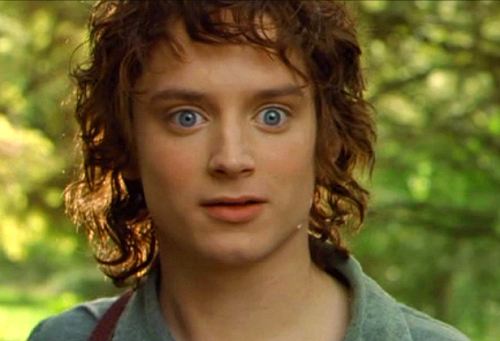
Caption the Surpised Frodo Meme Template
Surprised Frodo is a reaction image taken from The Lord of the Rings films, depicting Frodo Baggins with wide eyes and an expression of shock or horror. It is used to convey sudden alarm, disbelief, or the dawning realization that something has gone terribly wrong.
Caption this template- Category
- Situation Meme Templates
- Size
- 500 x 341 px
- Format
- Image
- Price
- Free, no sign up
Where the Surpised Frodo meme comes from
Released between 2001 and 2003, Peter Jackson's Lord of the Rings film trilogy is the source of this screen capture of actor Elijah Wood as Frodo Baggins. An extreme close-up reaction shot captured in that particular frame became widely circulated as a reaction meme on Reddit and image boards.
How to caption the Surpised Frodo meme
Place a mild or innocuous setup in the top text, then reveal an alarming or unexpected twist that justifies Frodo's horrified expression in the bottom text. Use it to represent the moment a situation escalates far beyond what was anticipated. Open it in the meme generator, or read how to make relatable memes for more.
Surpised Frodo caption ideas
Need a starting point? Try one of these on the Surpised Frodo template, then make it your own in the meme generator.
- Top: 'I'll just check one notification before bed' / Bottom: it's 3am and I'm reading about deep sea creatures
- Top: opening my banking app feeling pretty confident / Bottom: the available balance
- Top: 'The recipe says it serves four, easy' / Bottom: it has eleven steps and three pans I don't own
- Top: 'My code finally compiled with no errors' / Bottom: realizing I commented out the entire file
- Top: 'It's a casual get-together, no big deal' / Bottom: everyone is in suits and I'm in pajama pants
Best uses for the Surpised Frodo template
Use the Surpised Frodo template when the joke fits a situation format and the image can explain the feeling before the reader finishes the caption. It is strongest for relatable everyday moments, before-and-after jokes, and social observations.
This blank is 500 x 341 px and is a still image, so place the most important words where they stay readable after a feed crop. The wide frame works best when the caption stays centered so timeline crops do not cut off the joke.
The sample captions are more detailed, so trim aggressively before posting on small screens. Before exporting, read the caption once without looking at the image; if it still needs a long explanation, switch to a simpler setup or a more obvious related template.
Caption patterns to try
| Pattern | Why it works |
|---|---|
| Top: 'I'll just check one notification before bed' / Bottom: it's 3am and I'm reading about deep sea creatures | This works because it gives the reader a specific situation instead of a vague label. |
| Top: opening my banking app feeling pretty confident / Bottom: the available balance | This pattern keeps the setup concrete, which helps the template carry the reaction. |
| Top: 'The recipe says it serves four, easy' / Bottom: it has eleven steps and three pans I don't own | This is a useful direction when you want the punchline to feel personal or self-aware. |
Common mistakes with this blank
- Writing a caption that explains the whole joke instead of letting the Surpised Frodo image do part of the work.
- Placing text over the most expressive part of the image, especially faces, gestures, signs, or the main action.
- Using three different ideas in one meme. This template works better when it points at one clear situation.
- Exporting before checking the meme at phone size. If the smallest words blur together, shorten the caption first.