Caption the Blue Futurama Fry Meme Template
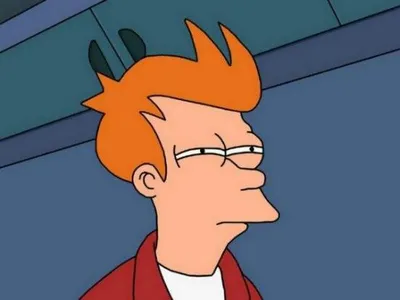
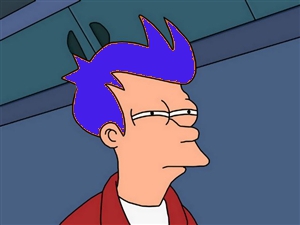
Blue Futurama Fry features Philip J. Fry from the animated series Futurama squinting skeptically with a blue color filter applied, giving it a distinctive look compared to the standard 'Not Sure If' template. The blue tint version is used to convey an even deeper level of suspicion or existential uncertainty, often applied to absurd hypotheticals. Captions follow the same two-line 'Not Sure If X / Or Y' format as the original.
Caption this template- Category
- Movie and TV Meme Templates
- Size
- 300 x 225 px
- Format
- Image
- Price
- Free, no sign up
Where the Blue Futurama Fry meme comes from
The image is taken from the Futurama episode 'The Lesser of Two Evils' (Season 2, 2000), where Fry squints while trying to determine whether someone is trustworthy. The blue-tinted variant emerged on meme boards as a visual riff on the original, likely created to distinguish a colder or more detached tone of suspicion.
How to caption the Blue Futurama Fry meme
Top text states 'Not sure if life is getting better' and bottom text reads 'Or I'm just getting used to it being bad.' Use it when you want to express a particularly bleak form of uncertainty that the standard yellow Fry image wouldn't quite capture. Open it in the meme generator, or read why memes go viral for more.
Blue Futurama Fry caption ideas
Need a starting point? Try one of these on the Blue Futurama Fry template, then make it your own in the meme generator.
- Top: Not sure if my coworker is being sarcastic / Bottom: Or that is just how they talk
- Top: Not sure if I'm tired / Bottom: Or I've been mildly tired for the last four years
- Top: Not sure if the gym is finally working / Bottom: Or this mirror is just nicer than the one at home
- Top: Not sure if I muted myself on the call / Bottom: Or everyone just heard me sigh
- Top: Not sure if I like my job / Bottom: Or I've forgotten what liking things feels like
Best uses for the Blue Futurama Fry template
Use the Blue Futurama Fry template when the joke fits a movie and TV format and the image can explain the feeling before the reader finishes the caption. It is strongest for recognizable scenes, character reactions, and pop-culture punchlines.
This blank is 300 x 225 px and is a still image, so place the most important words where they stay readable after a feed crop. The wide frame works best when the caption stays centered so timeline crops do not cut off the joke.
The sample captions are more detailed, so trim aggressively before posting on small screens. Before exporting, read the caption once without looking at the image; if it still needs a long explanation, switch to a simpler setup or a more obvious related template.
Caption patterns to try
| Pattern | Why it works |
|---|---|
| Top: Not sure if my coworker is being sarcastic / Bottom: Or that is just how they talk | This works because it gives the reader a specific situation instead of a vague label. |
| Top: Not sure if I'm tired / Bottom: Or I've been mildly tired for the last four years | This pattern keeps the setup concrete, which helps the template carry the reaction. |
| Top: Not sure if the gym is finally working / Bottom: Or this mirror is just nicer than the one at home | This is a useful direction when you want the punchline to feel personal or self-aware. |
Common mistakes with this blank
- Writing a caption that explains the whole joke instead of letting the Blue Futurama Fry image do part of the work.
- Placing text over the most expressive part of the image, especially faces, gestures, signs, or the main action.
- Using three different ideas in one meme. This template works better when it points at one clear situation.
- Exporting before checking the meme at phone size. If the smallest words blur together, shorten the caption first.