Caption the Brian Griffin Meme Template
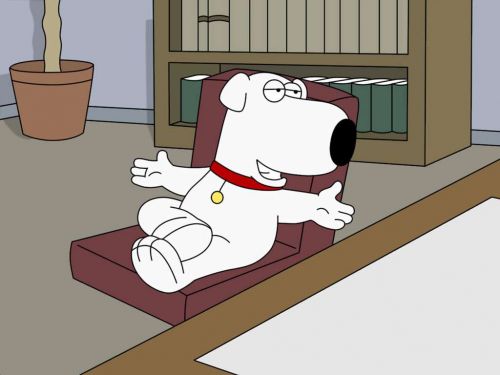
Brian Griffin memes feature the talking dog character from the animated series Family Guy, used to satirize pretentious intellectualism, failed creative ambitions, and the gap between self-perception and reality. Brian's character as a self-styled writer and intellectual who rarely finishes his novel makes him a perfect vehicle for mocking overconfident mediocrity.
Caption this template- Category
- Situation Meme Templates
- Size
- 500 x 375 px
- Format
- Image
- Price
- Free, no sign up
Where the Brian Griffin meme comes from
Brian Griffin is a main character in Family Guy, created by Seth MacFarlane and airing on Fox since 1999. The character is voiced by MacFarlane himself and was written as a sophisticated foil to the rest of the Griffin family, though the show increasingly used him to satirize pretentious liberal arts types.
How to caption the Brian Griffin meme
Write a caption where Brian pompously references his novel or intellectual credentials before revealing he has accomplished nothing substantial. Use the format to mock anyone who talks extensively about their creative projects without ever actually completing them. Open it in the meme generator, or read how to make relatable memes for more.
Brian Griffin caption ideas
Need a starting point? Try one of these on the Brian Griffin template, then make it your own in the meme generator.
- Setup: Telling everyone at the party I'm a writer / Payoff: I have written 4 paragraphs since 2019
- Setup: 'My novel explores the human condition' / Payoff: It's chapter one, and chapter one is a tweet
- Setup: Sipping a martini explaining why TV is dead / Payoff: Watched 9 hours of TV yesterday
- Setup: 'I could teach that class better than the professor' / Payoff: Dropped out of that exact class
- Setup: Correcting your grammar at brunch / Payoff: Still hasn't finished the screenplay he pitched in 2017
Best uses for the Brian Griffin template
Use the Brian Griffin template when the joke fits a situation format and the image can explain the feeling before the reader finishes the caption. It is strongest for relatable everyday moments, before-and-after jokes, and social observations.
This blank is 500 x 375 px and is a still image, so place the most important words where they stay readable after a feed crop. The wide frame works best when the caption stays centered so timeline crops do not cut off the joke.
The sample captions are more detailed, so trim aggressively before posting on small screens. Before exporting, read the caption once without looking at the image; if it still needs a long explanation, switch to a simpler setup or a more obvious related template.
Caption patterns to try
| Pattern | Why it works |
|---|---|
| Setup: Telling everyone at the party I'm a writer / Payoff: I have written 4 paragraphs since 2019 | This works because it gives the reader a specific situation instead of a vague label. |
| Setup: 'My novel explores the human condition' / Payoff: It's chapter one, and chapter one is a tweet | This pattern keeps the setup concrete, which helps the template carry the reaction. |
| Setup: Sipping a martini explaining why TV is dead / Payoff: Watched 9 hours of TV yesterday | This is a useful direction when you want the punchline to feel personal or self-aware. |
Common mistakes with this blank
- Writing a caption that explains the whole joke instead of letting the Brian Griffin image do part of the work.
- Placing text over the most expressive part of the image, especially faces, gestures, signs, or the main action.
- Using three different ideas in one meme. This template works better when it points at one clear situation.
- Exporting before checking the meme at phone size. If the smallest words blur together, shorten the caption first.