Caption the Don Draper Whiteboard Meme Template
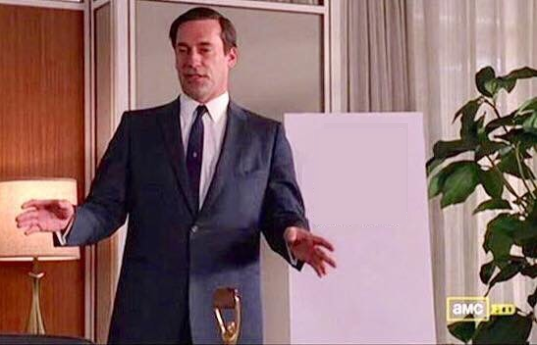
The Don Draper Whiteboard template shows Jon Hamm as Don Draper from 'Mad Men' at a whiteboard or in a presentation setting, used to represent pitching a ridiculous or obvious idea with unearned confidence and swagger. It is deployed when someone is overselling a simple or absurd solution as if it were a stroke of genius.
Caption this template- Category
- Text and Sign Meme Templates
- Size
- 537 x 345 px
- Format
- Image
- Price
- Free, no sign up
Where the Don Draper Whiteboard meme comes from
The image comes from AMC's drama series 'Mad Men,' which aired from 2007 to 2015, where Don Draper is a suave and confident advertising executive known for delivering persuasive pitches. Frames of him in presentation mode became a meme template for confidently pitching anything.
How to caption the Don Draper Whiteboard meme
Write an absurdly simple or obvious idea on the whiteboard that Draper is presenting with full conviction - 'What if we just… did the thing?' - To satirize corporate meeting culture and overconfident pitching. Alternatively, label the whiteboard with something genuinely clever that you are proud of, using Draper's swagger to own the idea unapologetically. Open it in the meme generator, or read the caption card guide for more.
Don Draper Whiteboard caption ideas
Need a starting point? Try one of these on the Don Draper Whiteboard template, then make it your own in the meme generator.
- Whiteboard: 'What if we made the button... bigger?' (six-figure consultant energy)
- Whiteboard: 'New strategy - Reply to the email instead of letting it haunt you for nine days'
- Whiteboard: 'Synergy is just doing your job but in a meeting about doing your job'
- Whiteboard: 'Step 1: turn it off. Step 2: turn it back on. Step 3: invoice them'
- Whiteboard: 'We pivot the brand by adding the word AI to the logo'
Best uses for the Don Draper Whiteboard template
Use the Don Draper Whiteboard template when the joke fits a text and sign format and the image can explain the feeling before the reader finishes the caption. It is strongest for labels, announcements, warnings, and quote-style memes.
This blank is 537 x 345 px and is a still image, so place the most important words where they stay readable after a feed crop. The wide frame works best when the caption stays centered so timeline crops do not cut off the joke.
The sample captions leave room for a setup and a punchline without turning into a paragraph. Before exporting, read the caption once without looking at the image; if it still needs a long explanation, switch to a simpler setup or a more obvious related template.
Caption patterns to try
| Pattern | Why it works |
|---|---|
| Whiteboard: 'What if we made the button... bigger?' (six-figure consultant energy) | This works because it gives the reader a specific situation instead of a vague label. |
| Whiteboard: 'New strategy - Reply to the email instead of letting it haunt you for nine days' | This pattern keeps the setup concrete, which helps the template carry the reaction. |
| Whiteboard: 'Synergy is just doing your job but in a meeting about doing your job' | This is a useful direction when you want the punchline to feel personal or self-aware. |
Common mistakes with this blank
- Writing a caption that explains the whole joke instead of letting the Don Draper Whiteboard image do part of the work.
- Placing text over the most expressive part of the image, especially faces, gestures, signs, or the main action.
- Using three different ideas in one meme. This template works better when it points at one clear situation.
- Exporting before checking the meme at phone size. If the smallest words blur together, shorten the caption first.