Caption the Gus Fring Meme Template
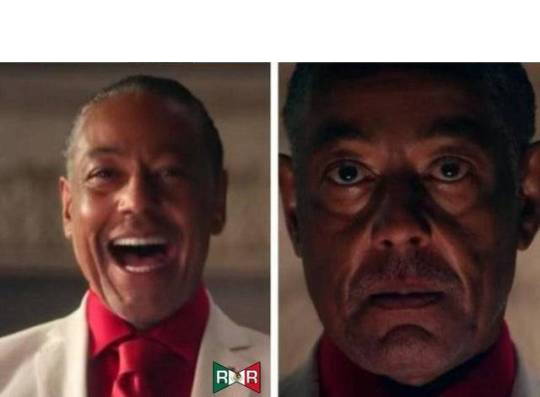
This template typically features Gustavo Fring from Breaking Bad maintaining his unnervingly calm, polite demeanor while clearly concealing dangerous intent. It is used to represent situations where someone is outwardly composed and professional while internally harboring hostility or plotting something sinister.
Caption this template- Category
- Situation Meme Templates
- Size
- 540 x 397 px
- Format
- Image
- Price
- Free, no sign up
Where the Gus Fring meme comes from
Gustavo Fring is a character from the AMC series Breaking Bad (2008–2013) and its prequel Better Call Saul, portrayed by Giancarlo Esposito. Fring's defining trait is his ability to project total normalcy as a fast-food manager while operating a criminal empire, making him a natural template for contrast-based humor.
How to caption the Gus Fring meme
Use the calm, smiling Gus image to represent how you appear externally in a professional or social situation, then describe what you are actually thinking or feeling underneath. Alternatively, label Gus as someone who behaves politely on the surface while you describe what they are actually capable of. Open it in the meme generator, or read how to make relatable memes for more.
Gus Fring caption ideas
Need a starting point? Try one of these on the Gus Fring template, then make it your own in the meme generator.
- How I look saying 'no worries, happy to help' to the third last-minute request today
- Me calmly replying 'sounds good!' while internally drafting my resignation
- Smiling at the family dinner while quietly counting how many times Uncle brings up politics
- Outwardly: 'take your time!' / Inwardly: the deadline was an hour ago
- Me politely thanking the support bot before I rage-type 'AGENT' for the fifth time
Best uses for the Gus Fring template
Use the Gus Fring template when the joke fits a situation format and the image can explain the feeling before the reader finishes the caption. It is strongest for relatable everyday moments, before-and-after jokes, and social observations.
This blank is 540 x 397 px and is a still image, so place the most important words where they stay readable after a feed crop. The wide frame works best when the caption stays centered so timeline crops do not cut off the joke.
The sample captions leave room for a setup and a punchline without turning into a paragraph. Before exporting, read the caption once without looking at the image; if it still needs a long explanation, switch to a simpler setup or a more obvious related template.
Caption patterns to try
| Pattern | Why it works |
|---|---|
| How I look saying 'no worries, happy to help' to the third last-minute request today | This works because it gives the reader a specific situation instead of a vague label. |
| Me calmly replying 'sounds good!' while internally drafting my resignation | This pattern keeps the setup concrete, which helps the template carry the reaction. |
| Smiling at the family dinner while quietly counting how many times Uncle brings up politics | This is a useful direction when you want the punchline to feel personal or self-aware. |
Common mistakes with this blank
- Writing a caption that explains the whole joke instead of letting the Gus Fring image do part of the work.
- Placing text over the most expressive part of the image, especially faces, gestures, signs, or the main action.
- Using three different ideas in one meme. This template works better when it points at one clear situation.
- Exporting before checking the meme at phone size. If the smallest words blur together, shorten the caption first.