Caption the Pie Chart Meme Meme Template
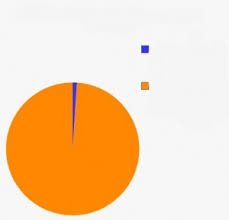
The Pie Chart Meme presents a comedic pie chart divided into labeled sections that humorously break down a topic into absurd or relatable categories. It is used to satirize how people allocate time, attention, or emotional energy.
Caption this template- Category
- Panel Meme Templates
- Size
- 229 x 220 px
- Format
- Image
- Price
- Free, no sign up
Where the Pie Chart Meme meme comes from
The Pie Chart Meme format has no single origin image; it uses generic pie chart graphics shared across Tumblr, Reddit, and Twitter starting in the early 2010s. The format persists as a blank template where users generate their own breakdowns.
How to caption the Pie Chart Meme meme
Create a pie chart with humorously imbalanced segments where one giant slice dominates to make the point absurd. Works best when the dominant slice is something embarrassing or irrational like overthinking or pretending to be busy. Open it in the meme generator, or read the two-panel meme guide for more.
Pie Chart Meme caption ideas
Need a starting point? Try one of these on the Pie Chart Meme template, then make it your own in the meme generator.
- Title 'My productivity': 90% making a detailed plan, 8% rearranging the plan, 2% doing the work
- Title 'My paycheck': 70% rent, 25% food delivery, 5% 'treating myself'
- Title 'Time spent coding': 85% figuring out why it broke, 15% writing new bugs
- Title 'My phone screen time': 60% apps I hate, 35% apps that make me sad, 5% the alarm clock
- Title 'Group project effort': 95% me, 5% the four other names on it
Best uses for the Pie Chart Meme template
Use the Pie Chart Meme template when the joke fits a panel format and the image can explain the feeling before the reader finishes the caption. It is strongest for short sequences, escalating ideas, and two-step reveals.
This blank is 229 x 220 px and is a still image, so place the most important words where they stay readable after a feed crop. The near-square frame is flexible for feeds, group chats, Reddit, and Discord.
The sample captions leave room for a setup and a punchline without turning into a paragraph. Before exporting, read the caption once without looking at the image; if it still needs a long explanation, switch to a simpler setup or a more obvious related template.
Caption patterns to try
| Pattern | Why it works |
|---|---|
| Title 'My productivity': 90% making a detailed plan, 8% rearranging the plan, 2% doing the work | This works because it gives the reader a specific situation instead of a vague label. |
| Title 'My paycheck': 70% rent, 25% food delivery, 5% 'treating myself' | This pattern keeps the setup concrete, which helps the template carry the reaction. |
| Title 'Time spent coding': 85% figuring out why it broke, 15% writing new bugs | This is a useful direction when you want the punchline to feel personal or self-aware. |
Common mistakes with this blank
- Writing a caption that explains the whole joke instead of letting the Pie Chart Meme image do part of the work.
- Placing text over the most expressive part of the image, especially faces, gestures, signs, or the main action.
- Using three different ideas in one meme. This template works better when it points at one clear situation.
- Exporting before checking the meme at phone size. If the smallest words blur together, shorten the caption first.