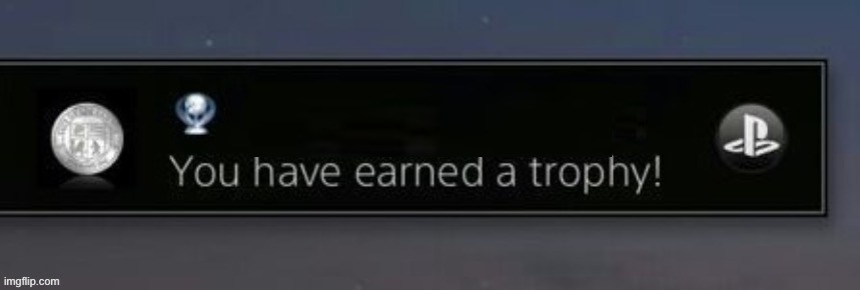
Caption the PlayStation trophy Meme Template
The PlayStation trophy notification, the pop-up that appears when a player unlocks an achievement in a game, is what this template uses, relabeled with real-life 'achievements' that are mundane, embarrassing, or absurdly specific. Mocking the gamification of everyday life is its purpose, along with celebrating minor personal victories that no one else would recognize.
Caption this template- Category
- Text and Sign Meme Templates
- Size
- 860 x 290 px
- Format
- Image
- Price
- Free, no sign up
Where the PlayStation trophy meme comes from
The PlayStation Trophy system was introduced by Sony with the PlayStation 3 firmware update in 2008. The on-screen notification pop-up, which shows the trophy type (Bronze, Silver, Gold, Platinum) and achievement name, became a widely recognized image that internet users began editing to reflect humorous real-world accomplishments.
How to caption the PlayStation trophy meme
Label the trophy name with a very specific, embarrassing, or low-effort achievement you actually managed to accomplish to make it feel like a genuine gaming milestone. You can also use a Gold or Platinum trophy type for something laughably easy to maximize the ironic contrast between the reward tier and the accomplishment. Open it in the meme generator, or read the caption card guide for more.
PlayStation trophy caption ideas
Need a starting point? Try one of these on the PlayStation trophy template, then make it your own in the meme generator.
- Trophy unlocked (Platinum): Replied to an email within the same calendar week
- Trophy unlocked (Gold): Got out of bed before the third alarm
- Trophy unlocked (Bronze): Made it through the meeting without saying 'you too' to the waiter
- Trophy unlocked (Platinum): Did not check phone for an entire 20 minutes
- Trophy unlocked (Silver): Remembered to take the reusable bags into the store
Best uses for the PlayStation trophy template
Use the PlayStation trophy template when the joke fits a text and sign format and the image can explain the feeling before the reader finishes the caption. It is strongest for labels, announcements, warnings, and quote-style memes.
This blank is 860 x 290 px and is a still image, so place the most important words where they stay readable after a feed crop. The wide frame works best when the caption stays centered so timeline crops do not cut off the joke.
The sample captions leave room for a setup and a punchline without turning into a paragraph. Before exporting, read the caption once without looking at the image; if it still needs a long explanation, switch to a simpler setup or a more obvious related template.
Caption patterns to try
| Pattern | Why it works |
|---|---|
| Trophy unlocked (Platinum): Replied to an email within the same calendar week | This works because it gives the reader a specific situation instead of a vague label. |
| Trophy unlocked (Gold): Got out of bed before the third alarm | This pattern keeps the setup concrete, which helps the template carry the reaction. |
| Trophy unlocked (Bronze): Made it through the meeting without saying 'you too' to the waiter | This is a useful direction when you want the punchline to feel personal or self-aware. |
Common mistakes with this blank
- Writing a caption that explains the whole joke instead of letting the PlayStation trophy image do part of the work.
- Placing text over the most expressive part of the image, especially faces, gestures, signs, or the main action.
- Using three different ideas in one meme. This template works better when it points at one clear situation.
- Exporting before checking the meme at phone size. If the smallest words blur together, shorten the caption first.