Caption the Windows Error Message Meme Template
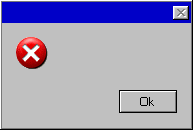
This template replicates the visual style of a Windows operating system error dialog box, used as a customizable format to present fake error messages about real-life situations. The familiar UI makes absurd or relatable error descriptions funnier by lending them false technical authority.
Caption this template- Category
- Blank Meme Templates
- Size
- 193 x 130 px
- Format
- Image
- Price
- Free, no sign up
Where the Windows Error Message meme comes from
The Windows error message format has been a meme staple since the early days of internet humor, drawing on the ubiquitous experience of seeing dialog boxes from Microsoft's Windows operating system. Customizable versions of the format have existed since at least the early 2000s and remain popular because the aesthetic is instantly recognizable across generations.
How to caption the Windows Error Message meme
Fill in the error title with a system or life function that has failed, then write a body message describing the problem in mock-technical language, optionally adding fake button choices like 'Ignore' or 'Give Up.' The funnier versions apply genuine IT error language to emotional or social problems. Open it in the meme generator, or read making your own template for more.
Windows Error Message caption ideas
Need a starting point? Try one of these on the Windows Error Message template, then make it your own in the meme generator.
- Error 0xMONDAY: Motivation.exe has stopped responding. [Ignore] [Give Up]
- Critical Error: Cannot allocate funds. Account balance below required threshold to 'treat yourself.' [Cancel] [Cry]
- Social_Battery.dll has crashed. The application 'BeingNormalAtTheParty' will now close. [Leave Early] [Hide in Bathroom]
- Update failed: 'I'll start the gym Monday' could not be installed for the 14th consecutive week. [Retry] [Postpone]
- Warning: Sleep schedule has encountered a fatal exception at 3:47 AM. [Doomscroll Anyway] [Pretend to Sleep]
Best uses for the Windows Error Message template
Use the Windows Error Message template when the joke fits a blank format and the image can explain the feeling before the reader finishes the caption. It is strongest for custom layouts, screenshots, labels, and reusable blank formats.
This blank is 193 x 130 px and is a still image, so place the most important words where they stay readable after a feed crop. The wide frame works best when the caption stays centered so timeline crops do not cut off the joke.
The sample captions leave room for a setup and a punchline without turning into a paragraph. Before exporting, read the caption once without looking at the image; if it still needs a long explanation, switch to a simpler setup or a more obvious related template.
Caption patterns to try
| Pattern | Why it works |
|---|---|
| Error 0xMONDAY: Motivation.exe has stopped responding. [Ignore] [Give Up] | This works because it gives the reader a specific situation instead of a vague label. |
| Critical Error: Cannot allocate funds. Account balance below required threshold to 'treat yourself.' [Cancel] [Cry] | This pattern keeps the setup concrete, which helps the template carry the reaction. |
| Social_Battery.dll has crashed. The application 'BeingNormalAtTheParty' will now close. [Leave Early] [Hide in Bathroom] | This is a useful direction when you want the punchline to feel personal or self-aware. |
Common mistakes with this blank
- Writing a caption that explains the whole joke instead of letting the Windows Error Message image do part of the work.
- Placing text over the most expressive part of the image, especially faces, gestures, signs, or the main action.
- Using three different ideas in one meme. This template works better when it points at one clear situation.
- Exporting before checking the meme at phone size. If the smallest words blur together, shorten the caption first.