Caption the Zuckerberg Meme Template
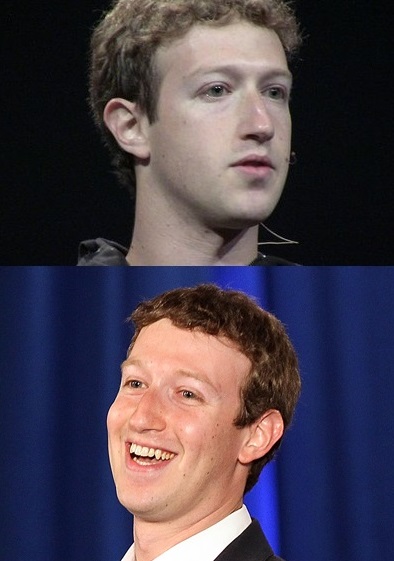
The Zuckerberg meme template features Facebook founder and CEO Mark Zuckerberg, typically capturing one of his many awkward public appearances, congressional testimonies, or publicity photos that made him appear robotic or socially disconnected. The format is used to joke about Zuckerberg's perceived lack of human affect, Facebook's data practices, or the surreal experience of watching a tech billionaire attempt to seem relatable. It doubles as commentary on Silicon Valley culture.
Caption this template- Category
- Situation Meme Templates
- Size
- 394 x 561 px
- Format
- Image
- Price
- Free, no sign up
Where the Zuckerberg meme comes from
Mark Zuckerberg became a recurring meme subject due to his 2018 congressional testimony about Facebook's data practices, during which his stilted responses and odd demeanor led to widespread jokes about him being an alien or a robot in a human suit. Viral photos from various public appearances added additional material for the format.
How to caption the Zuckerberg meme
Top text: 'When someone says they value their privacy' and bottom text: 'Interesting. Tell me more. For research.' Use it to satirize the inherent tension between tech platforms' data collection incentives and their public statements about caring deeply about user privacy. Open it in the meme generator, or read how to make relatable memes for more.
Zuckerberg caption ideas
Need a starting point? Try one of these on the Zuckerberg template, then make it your own in the meme generator.
- Top: When someone says they read the privacy policy / Bottom: Fascinating. Tell me everything. For the algorithm
- Top: When a senator asks how the company makes money / Bottom: Senator, we run ads. Also, I require water now
- Top: When you say you'd never sell your data / Bottom: Noted. Smiling in human. Logging your reaction
- Top: When someone deletes the app for good / Bottom: They will be back. They are always back
- Top: When asked to describe a feeling / Bottom: I have simulated joy and it was efficient
Best uses for the Zuckerberg template
Use the Zuckerberg template when the joke fits a situation format and the image can explain the feeling before the reader finishes the caption. It is strongest for relatable everyday moments, before-and-after jokes, and social observations.
This blank is 394 x 561 px and is a still image, so place the most important words where they stay readable after a feed crop. The tall frame gives you room for a short setup near the top and a payoff below the main subject.
The sample captions are more detailed, so trim aggressively before posting on small screens. Before exporting, read the caption once without looking at the image; if it still needs a long explanation, switch to a simpler setup or a more obvious related template.
Caption patterns to try
| Pattern | Why it works |
|---|---|
| Top: When someone says they read the privacy policy / Bottom: Fascinating. Tell me everything. For the algorithm | This works because it gives the reader a specific situation instead of a vague label. |
| Top: When a senator asks how the company makes money / Bottom: Senator, we run ads. Also, I require water now | This pattern keeps the setup concrete, which helps the template carry the reaction. |
| Top: When you say you'd never sell your data / Bottom: Noted. Smiling in human. Logging your reaction | This is a useful direction when you want the punchline to feel personal or self-aware. |
Common mistakes with this blank
- Writing a caption that explains the whole joke instead of letting the Zuckerberg image do part of the work.
- Placing text over the most expressive part of the image, especially faces, gestures, signs, or the main action.
- Using three different ideas in one meme. This template works better when it points at one clear situation.
- Exporting before checking the meme at phone size. If the smallest words blur together, shorten the caption first.