Caption the South Park Craig Meme Template
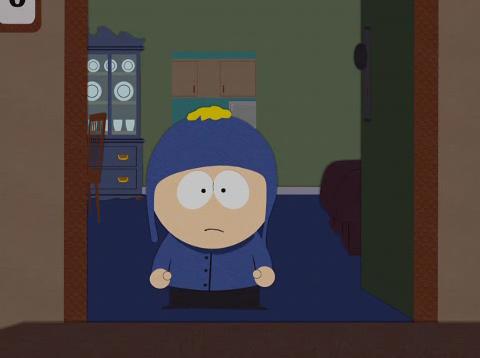
South Park Craig features Craig Tucker, a recurring background character from the animated series South Park, known for his perpetually deadpan expression and tendency to flip people off as his default reaction. The template is used to express complete indifference, low-key hostility, or the desire to silently dismiss something without engaging further. It resonates with people who relate to Craig's signature attitude of detached contempt for everything around him.
Caption this template- Category
- Movie and TV Meme Templates
- Size
- 480 x 358 px
- Format
- Image
- Price
- Free, no sign up
Where the South Park Craig meme comes from
Craig Tucker has appeared in South Park since its early seasons, created by Trey Parker and Matt Stone, with the show premiering in 1997. He became a fan-favorite minor character and gained his own spotlight episodes over the years. His image as the flat-affect, perpetually unimpressed kid with the middle finger became a recognizable meme in South Park fan communities.
How to caption the South Park Craig meme
Describe a situation in the top text that would normally provoke a strong reaction but that Craig simply cannot care about ('Everyone is excited about the school dance'). Then deliver Craig's signature non-response in the bottom text ('Craig flips you off and stares into the middle distance'). Open it in the meme generator, or read why memes go viral for more.
South Park Craig caption ideas
Need a starting point? Try one of these on the South Park Craig template, then make it your own in the meme generator.
- Everyone in the office is hyped about the new mandatory fun day / Craig flips you off and stares into the middle distance
- The group chat is planning a surprise party and wants your input / Craig responds with a single thumbs-down and silence
- Coworker excitedly explains their crypto strategy for the fourth time / Craig blinks once and walks away
- Teacher announces an exciting new group project / Craig raises a single finger and resumes drawing
- Friend asks if you're excited for the big reunion this weekend / Craig says nothing and continues to not care
Best uses for the South Park Craig template
Use the South Park Craig template when the joke fits a movie and TV format and the image can explain the feeling before the reader finishes the caption. It is strongest for recognizable scenes, character reactions, and pop-culture punchlines.
This blank is 480 x 358 px and is a still image, so place the most important words where they stay readable after a feed crop. The wide frame works best when the caption stays centered so timeline crops do not cut off the joke.
The sample captions are more detailed, so trim aggressively before posting on small screens. Before exporting, read the caption once without looking at the image; if it still needs a long explanation, switch to a simpler setup or a more obvious related template.
Caption patterns to try
| Pattern | Why it works |
|---|---|
| Everyone in the office is hyped about the new mandatory fun day / Craig flips you off and stares into the middle distance | This works because it gives the reader a specific situation instead of a vague label. |
| The group chat is planning a surprise party and wants your input / Craig responds with a single thumbs-down and silence | This pattern keeps the setup concrete, which helps the template carry the reaction. |
| Coworker excitedly explains their crypto strategy for the fourth time / Craig blinks once and walks away | This is a useful direction when you want the punchline to feel personal or self-aware. |
Common mistakes with this blank
- Writing a caption that explains the whole joke instead of letting the South Park Craig image do part of the work.
- Placing text over the most expressive part of the image, especially faces, gestures, signs, or the main action.
- Using three different ideas in one meme. This template works better when it points at one clear situation.
- Exporting before checking the meme at phone size. If the smallest words blur together, shorten the caption first.