Caption the The Office Bankruptcy Meme Template
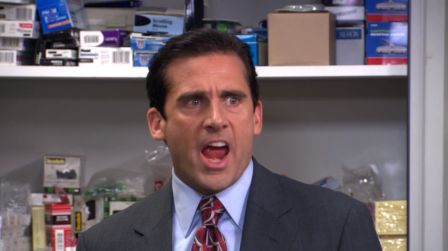
The scene from The Office (US) where Michael Scott dramatically declares 'I... declare... BANKRUPTCY!' by simply shouting the word rather than taking any real action is what this template uses. Mocking people or characters who believe that merely announcing something is equivalent to actually doing it is its purpose, along with parodying wishful thinking and self-delusion.
Caption this template- Category
- Movie and TV Meme Templates
- Size
- 448 x 251 px
- Format
- Image
- Price
- Free, no sign up
Where the The Office Bankruptcy meme comes from
The scene comes from Season 4, Episode 4 of The Office (US), which aired in 2007. Michael Scott, played by Steve Carell, announces Dunder Mifflin's financial troubles by yelling 'bankruptcy' in the office, misunderstanding how the legal process works. The clip became a recurring reference for performative but meaningless declarations.
How to caption the The Office Bankruptcy meme
Put the thing you are dramatically 'declaring' in the top caption and label Michael as yourself to show you think shouting it makes it real. Alternatively, label the top text as a real-life problem and Michael's declaration as your completely unhelpful coping strategy. Open it in the meme generator, or read why memes go viral for more.
The Office Bankruptcy caption ideas
Need a starting point? Try one of these on the The Office Bankruptcy template, then make it your own in the meme generator.
- Me, to my inbox: I... declare... INBOX ZERO (I archived everything unread)
- Me, about my debt: I... declare... it FUTURE ME'S PROBLEM
- Me, mid-argument: I... declare... I WAS RIGHT (I was not)
- Me, about my messy room: I... declare... it ORGANIZED CHAOS
- Me, to my responsibilities: I... declare... a MENTAL HEALTH DAY (it's Tuesday)
Best uses for the The Office Bankruptcy template
Use the The Office Bankruptcy template when the joke fits a movie and TV format and the image can explain the feeling before the reader finishes the caption. It is strongest for recognizable scenes, character reactions, and pop-culture punchlines.
This blank is 448 x 251 px and is a still image, so place the most important words where they stay readable after a feed crop. The wide frame works best when the caption stays centered so timeline crops do not cut off the joke.
The sample captions leave room for a setup and a punchline without turning into a paragraph. Before exporting, read the caption once without looking at the image; if it still needs a long explanation, switch to a simpler setup or a more obvious related template.
Caption patterns to try
| Pattern | Why it works |
|---|---|
| Me, to my inbox: I... declare... INBOX ZERO (I archived everything unread) | This works because it gives the reader a specific situation instead of a vague label. |
| Me, about my debt: I... declare... it FUTURE ME'S PROBLEM | This pattern keeps the setup concrete, which helps the template carry the reaction. |
| Me, mid-argument: I... declare... I WAS RIGHT (I was not) | This is a useful direction when you want the punchline to feel personal or self-aware. |
Common mistakes with this blank
- Writing a caption that explains the whole joke instead of letting the The Office Bankruptcy image do part of the work.
- Placing text over the most expressive part of the image, especially faces, gestures, signs, or the main action.
- Using three different ideas in one meme. This template works better when it points at one clear situation.
- Exporting before checking the meme at phone size. If the smallest words blur together, shorten the caption first.